How-toProjects and shipping
Ship a change
Commit, push or open a pull request from a chat, and choose whether pull requests open ready for review or as drafts.
All pagesCommit, push or open a pull request. About 2 minutes.
- Open Work → Changes → Open PR, Push branch or Commit.
- Choose How to ship: Commit, Push or PR.
- Check the branch, files and Pull request title.
- Select Open PR, Push branch or Commit.
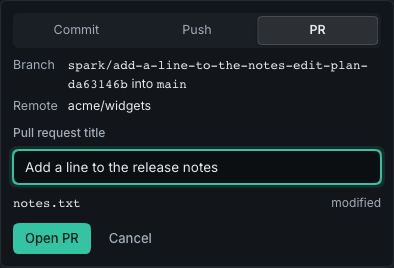
Ship commits only the task's own files, without secret files. Once a PR exists, the button reads Update PR. Nothing merges.
When the agent publishes
Ask for a PR, or set Full auto → PR. After changes, the agent handles publishing, including dirty local work without a remote. Your explicit “do not commit/push/open a PR” instructions win.
In sub-chats: stacks.
| First under the reply | Meaning |
|---|---|
| Opened pull request #12 | Spark tracks it. Several: one line. |
| "The branch was pushed, but no pull request was opened." | Create it from the link. |
| "Pushed …" | You asked only to push. |
| Push stopped by the pre-push check, with its last lines | Nothing was pushed. |
| "Not published: …" | Kept, not pushed. Ask again, or ship it. |
| "HEAD changed …" | Local HEAD changed; authorship unverified. |
The push uses your shell's logins; tokens never reach the agent. Without gh, the PR opens through your GitHub sign-in.
Chat and terminal pull requests appear above the composer and under Links, with checks, reviews and comments. Refresh re-reads GitHub.
PR is clean · ready to merge under the PR row means checks pass and no review thread or follow-up item is open. You merge.
Ready for review or draft
In Settings → GitHub, set Open pull requests as to Ready for review (default) or Draft. Or ask for a draft in your message.