How-toApprove and review
Answer an approval card
Allow or deny a command or file change an agent asks about, hold to confirm the risky ones, and let trusted commands run without asking.
All pagesAnswer an agent waiting for your permission. About 1 minute.
-
Find the card at the end of the turn, or press ⌘⇧Y.
-
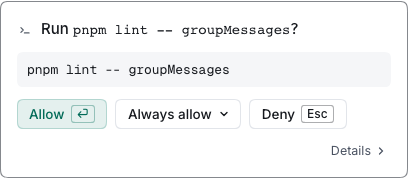
Read the command or diff; Details shows where it runs and why. A sub-agent's card names it.
-
Select a button; labels vary by agent.

| Button | Does |
|---|---|
| Allow (⏎) | Runs it this once. |
| Always allow | For the rest of this run, or Always allow in this project. |
| Deny (Esc) | Doesn't run it; the agent tries another way. |
Hold to confirm
Change git hooks or config? and Force push? have no ordinary allow button.
- Read the whole change.
- Hold Hold to allow once or Hold to force push for 1.5 seconds, with the mouse or Space.
- Let go early to cancel.

Let a command run without asking
- Select the project name in the message box.
- Open Commands that run without asking.
- Type a command and select Add. Select × to remove one.

A listed command covers longer forms too: pnpm test allows pnpm test -- api. Commands that touch protected paths, push or send data out always ask.
Where waiting cards show
Cards wait in the chat, on Home under Needs you, in the chat list as a Waiting for you dot, and on Spark Island.
Once answered, a command's card folds into its step: open it for You allowed it once or You denied it and the time. For what was allowed, select Audit this chat in the chat's … menu.